|
|
Mod Bug汇报
|
待解决
|
| 游戏版本: |
0.97 |
| Mod中文名: |
|
| Mod版本: |
|
游戏日志:
[游戏日志]
111 [main] INFO com.fs.starfarer.launcher.opengl.GLLauncher - Found display mode: 1680x1050, 48Hz, 32bpp
111 [main] INFO com.fs.starfarer.launcher.opengl.GLLauncher - Found display mode: 1680x1050, 30Hz, 32bpp
111 [main] INFO com.fs.starfarer.launcher.opengl.GLLauncher - Found display mode: 1680x1050, 240Hz, 32bpp
111 [main] INFO com.fs.starfarer.launcher.opengl.GLLauncher - Found display mode: 1920x1080, 120Hz, 32bpp
111 [main] INFO com.fs.starfarer.launcher.opengl.GLLauncher - Found display mode: 1920x1200, 240Hz, 32bpp
111 [main] INFO com.fs.starfarer.launcher.opengl.GLLauncher - Found display mode: 1920x1080, 30Hz, 32bpp
111 [main] INFO com.fs.starfarer.launcher.opengl.GLLauncher - Found display mode: 1920x1080, 60Hz, 32bpp
111 [main] INFO com.fs.starfarer.launcher.opengl.GLLauncher - Found display mode: 1920x1080, 48Hz, 32bpp
111 [main] INFO com.fs.starfarer.launcher.opengl.GLLauncher - Found display mode: 1920x1080, 240Hz, 32bpp
111 [main] INFO com.fs.starfarer.launcher.opengl.GLLauncher - Found display mode: 1920x1200, 120Hz, 32bpp
111 [main] INFO com.fs.starfarer.launcher.opengl.GLLauncher - Found display mode: 1920x1200, 30Hz, 32bpp
111 [main] INFO com.fs.starfarer.launcher.opengl.GLLauncher - Found display mode: 1920x1200, 60Hz, 32bpp
111 [main] INFO com.fs.starfarer.launcher.opengl.GLLauncher - Found display mode: 1920x1200, 48Hz, 32bpp
111 [main] INFO com.fs.starfarer.launcher.opengl.GLLauncher - Found display mode: 2048x1536, 48Hz, 32bpp
111 [main] INFO com.fs.starfarer.launcher.opengl.GLLauncher - Found display mode: 2048x1536, 60Hz, 32bpp
111 [main] INFO com.fs.starfarer.launcher.opengl.GLLauncher - Found display mode: 2048x1536, 30Hz, 32bpp
111 [main] INFO com.fs.starfarer.launcher.opengl.GLLauncher - Found display mode: 2048x1536, 120Hz, 32bpp
111 [main] INFO com.fs.starfarer.launcher.opengl.GLLauncher - Found display mode: 2048x1536, 240Hz, 32bpp
111 [main] INFO com.fs.starfarer.launcher.opengl.GLLauncher - Found display mode: 2560x1600, 120Hz, 32bpp
111 [main] INFO com.fs.starfarer.launcher.opengl.GLLauncher - Found display mode: 2560x1600, 30Hz, 32bpp
111 [main] INFO com.fs.starfarer.launcher.opengl.GLLauncher - Found display mode: 2560x1440, 240Hz, 32bpp
111 [main] INFO com.fs.starfarer.launcher.opengl.GLLauncher - Found display mode: 2560x1600, 48Hz, 32bpp
111 [main] INFO com.fs.starfarer.launcher.opengl.GLLauncher - Found display mode: 2560x1600, 60Hz, 32bpp
111 [main] INFO com.fs.starfarer.launcher.opengl.GLLauncher - Found display mode: 2560x1440, 30Hz, 32bpp
111 [main] INFO com.fs.starfarer.launcher.opengl.GLLauncher - Found display mode: 2560x1440, 60Hz, 32bpp
111 [main] INFO com.fs.starfarer.launcher.opengl.GLLauncher - Found display mode: 2560x1440, 48Hz, 32bpp
111 [main] INFO com.fs.starfarer.launcher.opengl.GLLauncher - Found display mode: 2560x1600, 240Hz, 32bpp
111 [main] INFO com.fs.starfarer.launcher.opengl.GLLauncher - Found display mode: 2560x1440, 120Hz, 32bpp
111 [main] INFO com.fs.starfarer.launcher.opengl.GLLauncher - Assuming native monitor resolution is 2560x1600
238 [Thread-2] INFO com.fs.graphics.K - Using refresh rate:240
449 [Thread-2] INFO com.fs.starfarer.launcher.opengl.GLLauncher - Maximum anti-aliasing samples: 16
506 [Thread-2] INFO com.fs.graphics.TextureLoader - Cleaned buffer for texture graphics/ui/launcher_bg.jpg (using cast)
517 [Thread-2] INFO com.fs.graphics.TextureLoader - Cleaned buffer for texture graphics/ui/launch_button_bg.png (using cast)
519 [Thread-2] INFO com.fs.graphics.TextureLoader - Cleaned buffer for texture graphics/ui/play_button0.png (using cast)
519 [Thread-2] INFO com.fs.graphics.TextureLoader - Cleaned buffer for texture graphics/ui/play_button1.png (using cast)
519 [Thread-2] INFO com.fs.graphics.TextureLoader - Cleaned buffer for texture graphics/ui/buttons/toggleA20x_on.png (using cast)
519 [Thread-2] INFO com.fs.graphics.TextureLoader - Cleaned buffer for texture graphics/ui/buttons/toggleA20x_off.png (using cast)
519 [Thread-2] INFO com.fs.graphics.TextureLoader - Cleaned buffer for texture graphics/ui/buttons/arrow_down.png (using cast)
519 [Thread-2] INFO com.fs.graphics.TextureLoader - Cleaned buffer for texture graphics/fx/scanline11.png (using cast)
519 [Thread-2] INFO com.fs.graphics.TextureLoader - Cleaned buffer for texture graphics/ui/bgs/ui_border1b_e.png (using cast)
519 [Thread-2] INFO com.fs.graphics.TextureLoader - Cleaned buffer for texture graphics/ui/bgs/ui_border1b_e_bot.png (using cast)
519 [Thread-2] INFO com.fs.graphics.TextureLoader - Cleaned buffer for texture graphics/ui/bgs/ui_border1b_e_top.png (using cast)
519 [Thread-2] INFO com.fs.graphics.TextureLoader - Cleaned buffer for texture graphics/ui/bgs/ui_border1b_w.png (using cast)
519 [Thread-2] INFO com.fs.graphics.TextureLoader - Cleaned buffer for texture graphics/ui/bgs/ui_border1b_w_bot.png (using cast)
519 [Thread-2] INFO com.fs.graphics.TextureLoader - Cleaned buffer for texture graphics/ui/bgs/ui_border1b_w_top.png (using cast)
519 [Thread-2] INFO com.fs.graphics.TextureLoader - Cleaned buffer for texture graphics/cursors/cursor_blue.png (using cast)
519 [Thread-2] INFO com.fs.graphics.TextureLoader - Cleaned buffer for texture graphics/cursors/cursor_blue_2x.png (using cast)
661 [Thread-2] INFO com.fs.graphics.TextureLoader - Cleaned buffer for texture graphics/fonts/orbitron24aabold_0.png (using cast)
840 [Thread-2] INFO com.fs.graphics.TextureLoader - Cleaned buffer for texture graphics/fonts/orbitron20aa_0.png (using cast)
946 [Thread-2] INFO com.fs.graphics.TextureLoader - Cleaned buffer for texture graphics/fonts/insignia15LTaa_0.png (using cast)
|
复现步骤:
进入游戏打开报错的存档就报错
|
-
报错
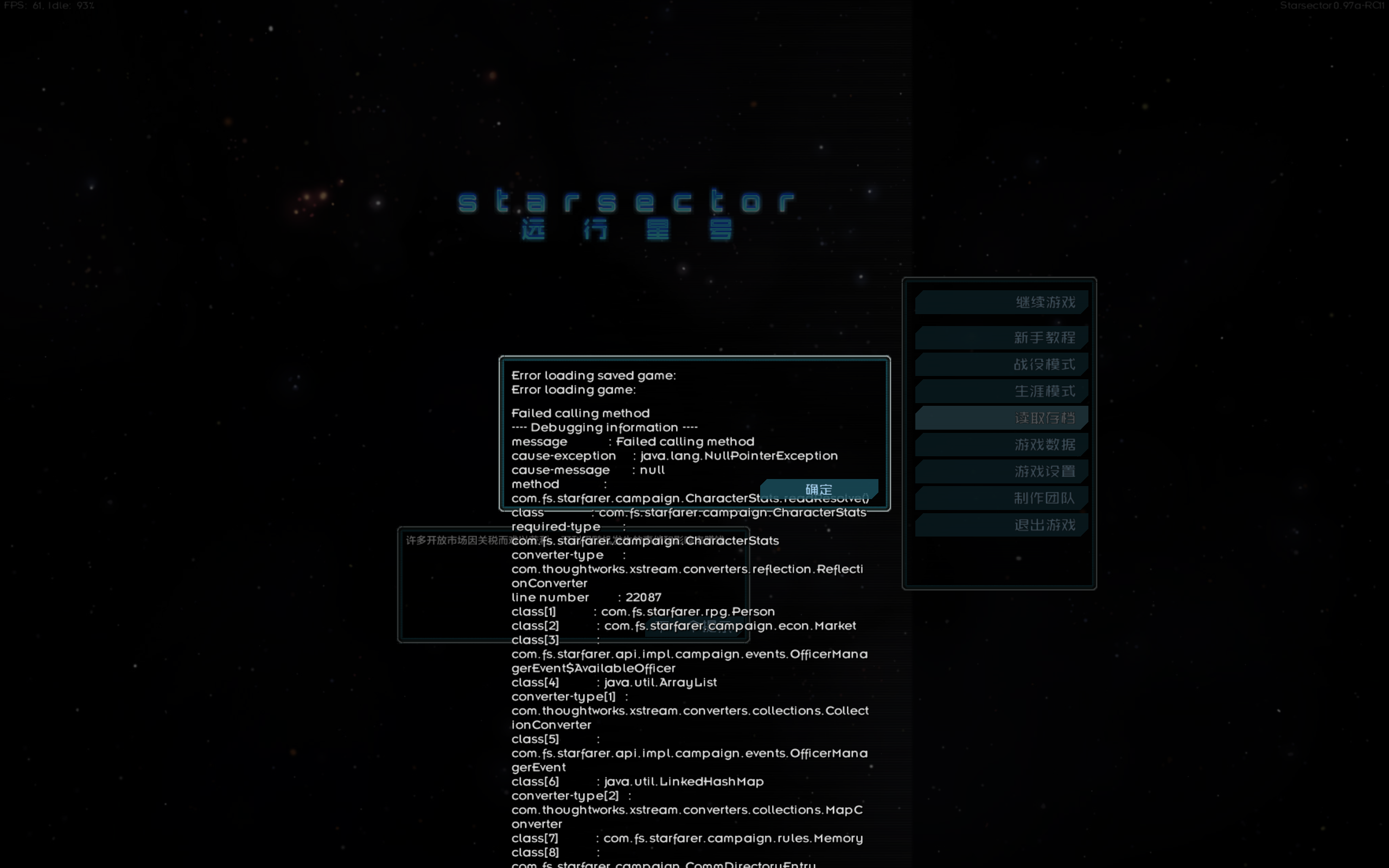
|



 发表于 2025-4-25 14:22:37